Menu
Speech Vectorization Explained: Building a Local AI for Pronunciation Detection
You will find the 🇫🇷 French version of this article here
- Build a local pronunciation coach with Wav2Vec2 and Dynamic Time Warping.
- Understand the basics: audio embeddings, distances, temporal alignment, phonemes and visemes.
- An open source, practical and motivating project to improve spoken English.
Reading or writing has never been much of a problem for me, but as soon as it comes to speaking, I realize my pronunciation is not always clear.
ChatGPT is great for text, but current generative models are not designed to evaluate pronunciation.
So I asked myself: what if I built my own pronunciation coach?
A tool that:
- listens to me,
- compares what I say to a reference,
- and gives me clear and visual feedback.
That’s the project I’ll detail here, while also breaking down the AI building blocks: embeddings, distances, DTW, phonemes, visemes.
Why is comparing two sounds so hard?
A spoken word is not a sequence of letters, but a sound wave that varies over time:
- the air vibrates,
- the voice rises and falls,
- some parts are long, others very short.
Even two people pronouncing exactly the same word will never have identical curves.
The central question becomes: how do you compare two audios that do not align perfectly?
The chosen approach
Here’s an overview of the architecture I set up:
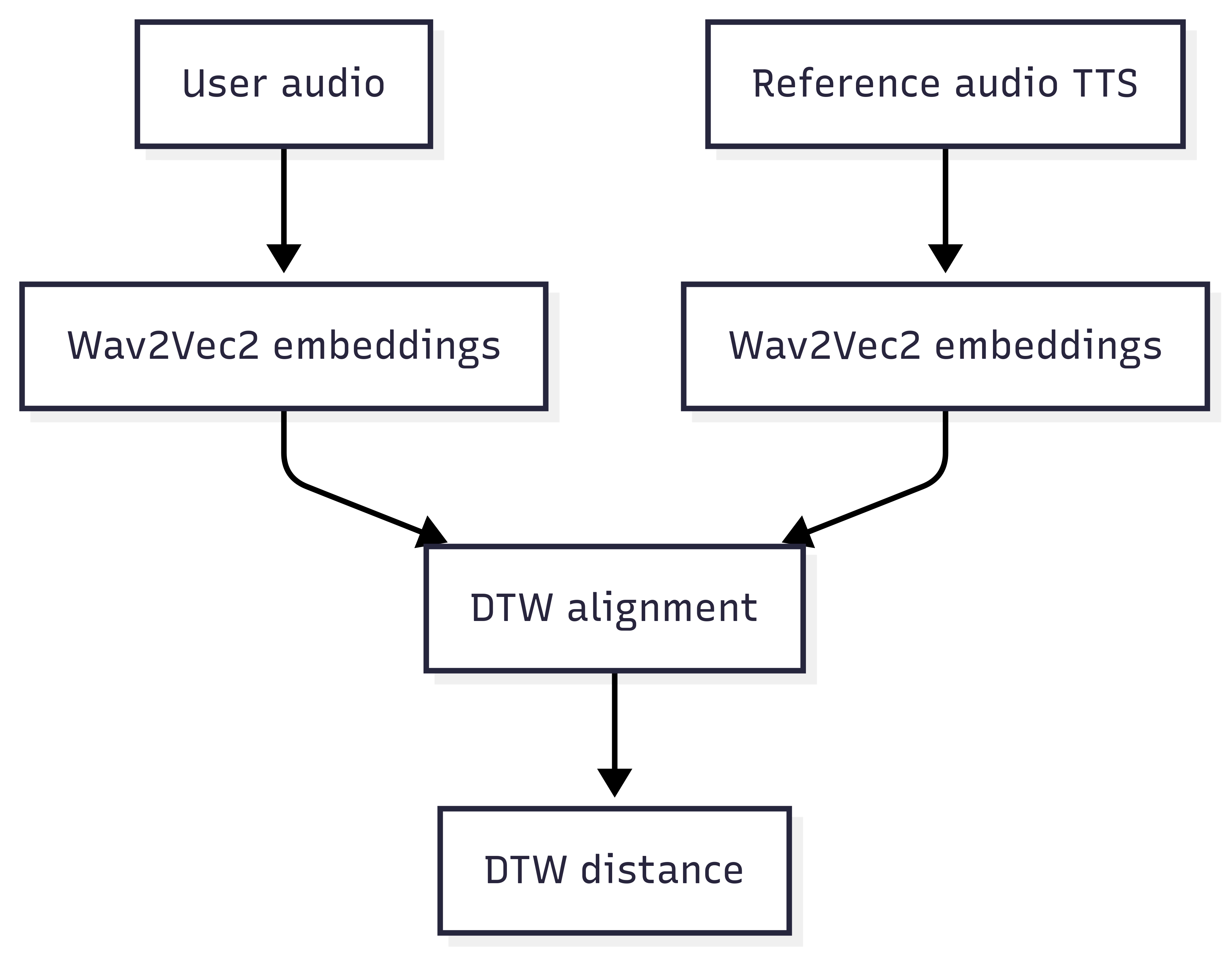
Don’t worry(we’ll break down all these concepts step by step.
Turning sound into numbers: embeddings
A computer does not understand sound. It only manipulates vectors of numbers.
- A vector = a list of numbers, e.g.
[0.2, -0.7, 1.1]. - An audio embedding = a condensed representation of a short audio segment.
With Wav2Vec2, every few milliseconds of audio are encoded into 768 numbers describing timbre, energy, articulation, etc.
processor = Wav2Vec2Processor.from_pretrained("facebook/wav2vec2-large-960h")

def extract_embeddings(audio_waveform, sampling_rate=16000):
    inputs = processor(audio_waveform, sampling_rate=sampling_rate,
                       return_tensors="pt", padding=True)
    input_values = inputs.input_values.squeeze(0)
    with torch.no_grad():
        features = model(input_values).last_hidden_state
    return features.squeeze(0).numpy()
In short:
- similar sounds → close vectors,
- different sounds → distant vectors.
Measuring similarity: distances
Once two vectors are extracted, you need to measure their proximity.
The basic tool: Euclidean distance.
Simple example between [1,2] and [4,6]:
√((4-1)² + (6-2)²) = 5
With audio embeddings, it’s the same principle, but in a 768-dimensional space.
from fastdtw import fastdtw
from scipy.spatial.distance import euclidean

def compare_pronunciation(expected, actual):
    expected_seq = get_phoneme_embeddings(expected)
    actual_seq = get_phoneme_embeddings(actual)
    distance, _ = fastdtw(expected_seq, actual_seq, dist=euclidean)
    return distance
DTW: when speech is not at the same speed
Problem: a word can last 0.5 seconds for me and 0.8 seconds in the reference.
If you compare naively, it fails.
The solution: Dynamic Time Warping (DTW).
This algorithm aligns two sequences of different speeds by “stretching” or “compressing” time to match similar parts.
import numpy as np

def align_sequences_dtw(seq1, seq2):
    distance, path = fastdtw(seq1, seq2, dist=euclidean)
    aligned1, aligned2 = [], []
    for i, j in path:
        aligned1.append(seq1[i][0])
        aligned2.append(seq2[j][0])
    return np.array(aligned1), np.array(aligned2)
Result: a robust comparison, even when pacing differs.
Phonemes and visemes: hear AND see
Some sounds are hard to distinguish by ear.
Example: “think” vs “sink” (subtle difference between /θ/ and /s/).
- A phoneme = the smallest distinctive sound (e.g. /p/, /a/, /t/).
- A viseme = the visual mouth shape that produces that sound.
In my prototype, when a word is mispronounced, I can click on it and see a mouth animation showing the correct articulation.
👉 Learning becomes more concrete: I both hear and see what to correct.
(Microsoft documentation on visemes)
The complete pipeline
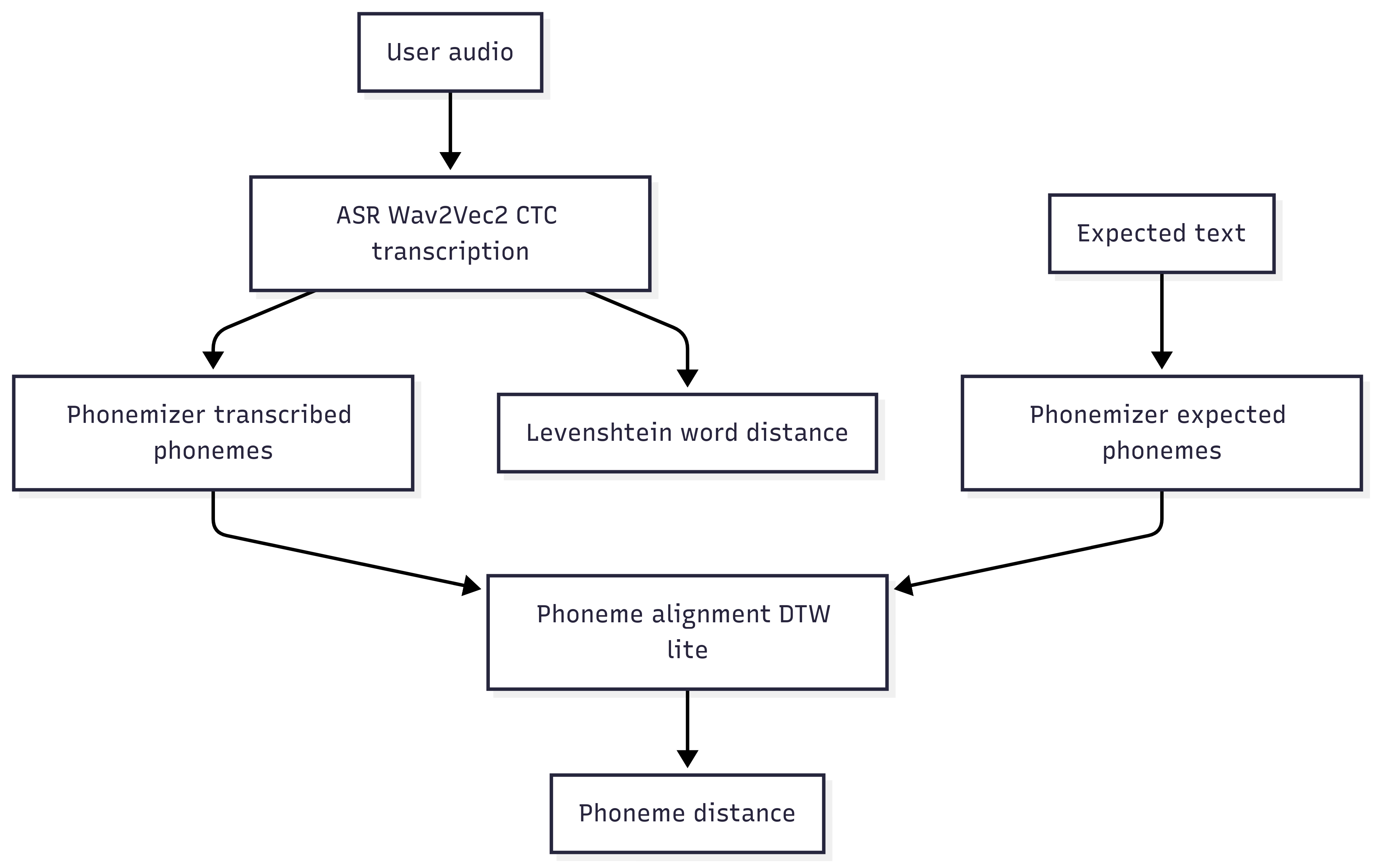
- I write a text: “Hello, how are you?”.
- The system generates a reference voice (e.g. gTTS).
- I record my voice.
- Extract Wav2Vec2 embeddings for both audios.
- Align them with DTW.
- Compare phoneme by phoneme.
- Feedback returned:
- a global score (out of 100),
- a list of mispronounced words,
- clear feedback: “❌ You should pronounce better: Hello, you”,
- and the corresponding visemes.
Limitations of the approach
Let’s be honest:
- Wav2Vec2 was not trained to score pronunciation → approximation.
- Synthetic voices are imperfect → sometimes artificial accent.
- Simplified visemes → animations too discrete compared to a real mouth.
- Subjectivity remains → a native listener is still the ultimate reference.
What it still brings
- I can listen to myself objectively.
- I can spot my mistakes without a teacher.
- I get visual feedback.
- And most importantly: I stay motivated to practice.
Ways forward
- Integrate specialized pronunciation scoring models (commercial APIs).
- Improve visemes with smooth 3D animation.
- Add prosody (intonation, stress, rhythm).
- Extend to other languages.
- Evaluate longer sentences (reading, dialogue).
Conclusion
I haven’t reinvented Duolingo. But I have built a home-made coach that helps me improve my speaking.
The strength comes from the combination of:
- AI (Wav2Vec2) to turn voice into vectors,
- classic algorithms (DTW) to compare,
- pedagogical visuals (visemes) to correct.
A mix of machine learning, math, and pedagogy, all serving a very concrete goal: speaking English better.
👉 Source code is available on GitHub.
Feedback or contributions are welcome.
💡 Ces sujets vous parlent ?
Vous voulez améliorer la qualité de vos projets sans ralentir la livraison.
J'accompagne les équipes PHP avec des audits ciblés et des formations concrètes. Architecture, tests, industrialisation et pratiques d'équipe, chaque intervention est adaptée à votre contexte.
© Jean-François Lépine, 2010 - 2026